Usage
DMagic retrieves user and experiment information from the APS scheduling system and integrates with the APS Data Management (DM) system (Sojourner) for experiment and user access management.
Initialization
To create the DMagic configuration file with default values:
(dm) $ dmagic init
This creates ~/dmagic.conf. Edit the [site] section to configure it for your
beamline before using any other commands:
[general]

[settings]
set = 0

[site]
beamline = 2-BM-A,B
credentials = /home/beams/2BMB/.scheduling_credentials
experiment-type = 2BM
globus-message-file = message-2bm.txt
globus-server-uuid = 054a0877-97ca-4d80-947f-47ca522b173e
primary-beamline-contact-badge = 218262
primary-beamline-contact-email = pshevchenko@anl.gov
secondary-beamline-contact-badge = 49734
secondary-beamline-contact-email = decarlo@anl.gov
tomoscan-prefix = 2bmb:TomoScan:
url = https://beam-api.aps.anl.gov
verbose = True

[manual]
name = Staff
title = Commissioning

[local]
analysis = tomodata3
analysis-top-dir = /data3/2BM/
Note
The [site] and [local] sections only need to be configured once per beamline
installation. The [manual] section provides defaults for dmagic create-manual.
Scheduling System Commands
dmagic show
Queries the APS scheduling REST API to display the currently active experiment:
(dm) $ dmagic show
2026-03-04 09:00:00,000 - Today's date: 2026-03-04 09:00:00.000000+00:00
2026-03-04 09:00:00,700 -   Run: 2026-1
2026-03-04 09:00:00,701 -   PI Name: Weinong Chen
2026-03-04 09:00:00,702 -   PI affiliation: Purdue University
2026-03-04 09:00:00,703 -   PI e-mail: wchen@purdue.edu
2026-03-04 09:00:00,704 -   PI badge: 226531
2026-03-04 09:00:00,705 -   Proposal GUP: 66310
2026-03-04 09:00:00,706 -   ESAF number: 289884
2026-03-04 09:00:00,707 -   Proposal Title: In-situ visualization of ...
2026-03-04 09:00:00,708 -   Proposal type: GUP
2026-03-04 09:00:00,709 -   Submitted: 2025-09-15
2026-03-04 09:00:00,710 -   Granted shifts: 6  (scheduled: 6)
2026-03-04 09:00:00,711 -   Proprietary: N  |  Mail-in: N
2026-03-04 09:00:00,712 -   Start date: 2026_03_03
2026-03-04 09:00:00,713 -   Start time: 2026-03-03 08:00:00-06:00
2026-03-04 09:00:00,714 -   End Time: 2026-03-05 08:00:00-06:00
2026-03-04 09:00:00,715 -   User email address:
2026-03-04 09:00:00,716 -        user1@university.edu
2026-03-04 09:00:00,717 -        user2@lab.gov
Use --set N to offset the date (negative for past, positive for future):
(dm) $ dmagic show --set -1500
dmagic tag
Fetches the same scheduling data and writes it to EPICS PVs on the TomoScan IOC:
(dm) $ dmagic tag
2026-03-04 09:00:00,000 - Today's date: 2026-03-04 09:00:00.000000
2026-03-04 09:00:01,000 - User/Experiment PV update
2026-03-04 09:00:01,001 - Updating pi_name EPICS PV with: Weinong
2026-03-04 09:00:01,002 - Updating pi_last_name EPICS PV with: Chen
2026-03-04 09:00:01,003 - Updating pi_affiliation EPICS PV with: Purdue University
2026-03-04 09:00:01,004 - Updating pi_email EPICS PV with: wchen@purdue.edu
2026-03-04 09:00:01,005 - Updating pi_badge EPICS PV with: 226531
2026-03-04 09:00:01,006 - Updating user_info_update_time EPICS PV with: 2026-03-04T09:00:01-06:00
2026-03-04 09:00:01,007 - Updating proposal_number EPICS PV with: 66310
2026-03-04 09:00:01,008 - Updating proposal_title EPICS PV with: In-situ visualization of ...
2026-03-04 09:00:01,009 - Updating experiment_date EPICS PV with: 2026-03
2026-03-04 09:00:01,010 - Updating esaf_number EPICS PV with: 289884
The information will be updated in the medm screen:
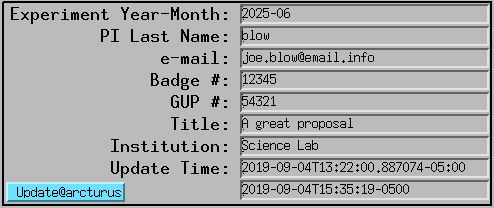
If no proposal is found in the scheduling system for the current run, dmagic tag
exits cleanly with a message:
2026-03-18 13:36:07,890 - No proposal found in the scheduling system for this run
2026-03-18 13:36:07,891 - If you have a scheduled proposal: run 'dmagic create' to create the DM experiment
2026-03-18 13:36:07,892 - For commissioning or manual runs: run 'dmagic create-manual' instead
2026-03-18 13:36:07,893 - Then run 'dmagic tag-manual' to select the experiment and update the EPICS PVs
dmagic tag-manual
Interactively lists all DM experiments for the station — both scheduling-based and manually created, sorted newest first — and lets the operator choose which one to write to the EPICS PVs:
(dm) $ dmagic tag-manual
2026-03-18 13:34:52,000 - Today's date: 2026-03-18 13:34:52.000000
2026-03-18 13:34:52,500 - Found 3 DM experiment(s) for station 32ID:
  [ 0] 2026-03-Nikitin-0                    2026-03-01 to 2026-03-15  Commissioning
  [ 1] 32ID-TXM-CommissioningI              2025-03-04 to 2025-05-01  32-ID Operations Commissioning
  [ 2] 2025-TXM-CommissioningI              2025-03-14 to 2025-05-01  32-ID Technical Comissioning

Select experiment to tag [0-2] or 'q' to quit: 0
2026-03-18 13:34:55,000 - Selected DM experiment: 2026-03-Nikitin-0
2026-03-18 13:34:55,100 - Using PI info parsed from DM experiment name (first name, institution, email, badge will be empty)
2026-03-18 13:34:55,200 - User/Experiment PV update
2026-03-18 13:34:55,201 - Updating pi_name EPICS PV with:
2026-03-18 13:34:55,202 - Updating pi_last_name EPICS PV with: Nikitin
2026-03-18 13:34:55,203 - Updating pi_affiliation EPICS PV with:
2026-03-18 13:34:55,204 - Updating pi_email EPICS PV with:
2026-03-18 13:34:55,205 - Updating pi_badge EPICS PV with:
2026-03-18 13:34:55,206 - Updating user_info_update_time EPICS PV with: 2026-03-18T13:34:55-06:00
2026-03-18 13:34:55,207 - Updating proposal_number EPICS PV with: 0
2026-03-18 13:34:55,208 - Updating proposal_title EPICS PV with: Commissioning
2026-03-18 13:34:55,209 - Updating experiment_date EPICS PV with: 2026-03
2026-03-18 13:34:55,210 - Updating esaf_number EPICS PV with:
For scheduling-based experiments (non-zero GUP), full PI info is fetched from the scheduling system automatically. This command is also useful when you need to switch the EPICS PVs to a different user group mid-run without touching the scheduling system.
Note
For commissioning runs with no scheduling proposal, the typical workflow is:
dmagic create-manual— create the DM experimentdmagic tag-manual— activate it in the EPICS PVsdmagic email— notify users of their Globus data link (optional)dmagic daq-start— start automated file transfer (optional)
(dm) $ dmagic tag-manual -h
usage: dmagic tag-manual [-h] [--set SET] [--config FILE]

Interactively pick a DM experiment and update user info EPICS PVs

options:
  -h, --help     show this help message and exit
  --set SET      Number of +/- days offset from today for past/future user groups (default: 0)
  --config FILE  File name of configuration (default: /home/beams/2BMB/dmagic.conf)
DM Experiment Management
The create, create-manual, delete, email, daq-start, daq-stop,
add-user, remove-user, list-users, and list-esafs commands integrate
with the APS Data Management (DM) system (Sojourner) to manage experiment records,
user data access via Globus, automated file transfer, and ESAF queries. These commands
require the [site] section of ~/dmagic.conf to be correctly configured (see
Initialization above). The daq-start and daq-stop commands additionally
require the [local] section to be configured with the correct analysis hostname and
data directory.
DM data-directory format: dm-direct-mount
The [local] config knob dm-direct-mount controls how dmagic hands the
source path to the DM DAQ:
dm-direct-mount = False(default) — dmagic passes@{analysis}:{analysis-top-dir}/{exp-name}todaq_api.upload()/startDaq(). DM then rsyncs from the analysis host over SSH.dm-direct-mount = True— dmagic passes the bare local path{analysis-top-dir}/{exp-name}. Use this when the DM VM already mounts the analysis filesystem directly (for example, the 2-BM DM VM hastomodata2:/data2mounted). On some DM installations the@host:syntax has a bug wheredaq_api.upload()returnscountFiles=0with"no new files for upload"even for a directory that contains matching files; the bare-path form works correctly there.
Passwordless SSH prerequisite (for source pre-check)
dmagic upload and dmagic daq-start inspect the source directory
({analysis-top-dir}/{exp-name} and its _rec sibling) before dispatching to
DM, and warn if it is empty or missing. This is important because the DM DAQ silently
accepts a nonexistent source and reports “started successfully” while transferring zero
bytes — a misconfigured analysis / analysis-top-dir in ~/dmagic.conf can
otherwise produce a successful-looking run with an empty destination.
The pre-check works two ways:
If the host running dmagic already mounts the analysis directory (typical on beamline nodes like
tomo1,tomo3,tocai), the check is done locally with no setup.If dmagic is run from a control computer that does not mount
/data2//data3(typical onarcturus), dmagic falls back to an SSH probe on the analysis host. This requires passwordless SSH to be set up once:# On the control computer, as 2bmb ssh-keygen -t ed25519 -N '' -f ~/.ssh/id_ed25519 # only if you don't have a key yet ssh-copy-id tomodata2 ssh-copy-id tomodata3 # verify ssh -o BatchMode=yes tomodata2 'echo ok' ssh -o BatchMode=yes tomodata3 'echo ok'
If SSH cannot be used (no key, host unreachable), dmagic logs a warning with the setup steps above and dispatches to DM anyway — the pre-check is a safety net, not a hard requirement.
dmagic create
Creates a DM experiment on Sojourner for a proposal-based beamtime. Lists all beamtimes in the current APS run and prompts for selection, then creates the experiment and adds all users from the scheduling proposal:
(dm) $ dmagic create
2026-03-04 09:00:00,000 - Found 3 beamtimes in run 2026-1:
  [ 0] GUP 1018528 - PI: Li - Investigation of multifunctional biomineralized ...
       2026-03-11 to 2026-03-14
  [ 1] GUP 1019623 - PI: Socha - Biomechanical constraints and trade-offs ...
       2026-03-07 to 2026-03-09
  [ 2] GUP 1012039 - PI: Li - Investigation of coupled mechanisms ...
       2026-03-03 to 2026-03-05

Select beamtime [0-2] or 'q' to quit: 2
2026-03-04 09:00:05,000 - Create summary:
2026-03-04 09:00:05,001 -    Experiment : 2026-03/2026-03-Li-1012039
2026-03-04 09:00:05,002 -    Title      : Investigation of coupled mechanisms ...
   *** Confirm? Yes or No (Y/N): Y
2026-03-04 09:00:08,000 -    Experiment successfully created: 2026-03-Li-1012039
2026-03-04 09:00:08,500 -    Added user Tao Li to the DM experiment
2026-03-04 09:00:08,600 -    Added user Pavel Shevchenko to the DM experiment
...
2026-03-04 09:00:09,000 - ============================================================
2026-03-04 09:00:09,001 - Experiment name : 2026-03-Li-1012039
2026-03-04 09:00:09,002 - Globus data link: https://app.globus.org/file-manager?...
2026-03-04 09:00:09,003 - ============================================================
(dm) $ dmagic create -h
usage: dmagic create [-h] [--set SET] [--config FILE]

Create a DM experiment from the APS scheduling system

options:
  -h, --help     show this help message and exit
  --set SET      Number of +/- days offset from today for past/future user groups (default: 0)
  --config FILE  File name of configuration (default: /home/beams/2BMB/dmagic.conf)
dmagic create-manual
Creates a DM experiment manually for commissioning runs or staff experiments that have
no scheduling proposal. PI name, title, and optional badge numbers are provided on the
command line. The experiment name is formatted as yyyy-mm-{LastName}-{gup}.
Basic commissioning example (GUP 0, current month, 14-day window):
(dm) $ dmagic create-manual --name DeCarlo --first-name Francesco --title "2-BM commissioning"
With explicit GUP number and date range:
(dm) $ dmagic create-manual --name DeCarlo --first-name Francesco \
          --title "2-BM run" --gup 1 --start 2026-05-01 --end 2026-05-07
If an invalid date format is entered, the command exits with an error:
ERROR - Invalid --start '05/01/2026': expected format is yyyy-mm-dd (e.g. 2026-05-01)
(dm) $ dmagic create-manual -h
usage: dmagic create-manual [-h] [--badges BADGES] [--date DATE] [--email EMAIL]
                            [--end END] [--first-name FIRST_NAME] [--gup GUP]
                            [--institution INSTITUTION] [--name NAME]
                            [--start START] [--title TITLE] [--config FILE]

Create a DM experiment manually for commissioning runs

options:
  -h, --help            show this help message and exit
  --badges BADGES       Comma-separated badge numbers to add to the experiment (default: )
  --date DATE           Year-month in yyyy-mm format (default: current month) (default: )
  --email EMAIL         PI email address (default: )
  --end END             Experiment end date in yyyy-mm-dd format
                        (default: 14 days after --start or --date) (default: )
  --first-name FIRST_NAME
                        PI first name (default: )
  --gup GUP             GUP number (default: 0 = commissioning/no proposal) (default: 0)
  --institution INSTITUTION
                        PI institution (default: )
  --name NAME           PI last name (default: Staff)
  --start START         Experiment start date in yyyy-mm-dd format
                        (default: first day of --date month) (default: )
  --title TITLE         Experiment title (default: Commissioning)
  --config FILE         File name of configuration (default: /home/beams/2BMB/dmagic.conf)
dmagic delete
Deletes a DM experiment from Sojourner. Lists all experiments for the configured station from the last 2 calendar years — this includes both proposal-based and manually created experiments. Requires double confirmation before deleting:
(dm) $ dmagic delete
2026-03-04 22:49:10,028 - Found 11 DM experiment(s) for station 2BM:
  [ 0] 2026-03-Li-1018528                   2026-03-11 to 2026-03-14  Investigation of multifunctional biomineralized ...
  [ 1] 2026-03-Socha-1019623                2026-03-07 to 2026-03-09  Biomechanical constraints and trade-offs ...
  [ 2] 2026-03-Li-1012039                   2026-03-03 to 2026-03-05  Investigation of coupled mechanisms ...
  [ 3] 2026-03-DeCarlo-0                    2026-03-01 to 2026-03-15  Vibration Tests
  [ 4] 2026-03-Staff-0                      2026-03-04 to 2026-03-18  Commissioning
  ...
  [10] Nikitin-2025-06                      2025-06-23 to 2025-06-27  Viktor data from 2025-06

Select experiment to delete [0-10] or 'q' to quit: 4
2026-03-04 22:49:39,325 - ============================================================
2026-03-04 22:49:39,326 - *** PERMANENT DELETION — THIS CANNOT BE UNDONE ***
2026-03-04 22:49:39,327 -    Experiment     : 2026-03-Staff-0
2026-03-04 22:49:39,328 -    Storage dir    : /gdata/dm/2BM/2026-03/2026-03-Staff-0
2026-03-04 22:49:39,329 -    Data dir       : /gdata/dm/2BM/2026-03/2026-03-Staff-0/data
2026-03-04 22:49:39,330 -    Analysis dir   : /gdata/dm/2BM/2026-03/2026-03-Staff-0/analysis
2026-03-04 22:49:39,331 - ============================================================
   *** Are you sure? Yes or No (Y/N): Y
   *** Confirm AGAIN to permanently delete all data (Y/N): Y
2026-03-04 22:49:46,336 - Deleting DM experiment: 2026-03-Staff-0
2026-03-04 22:49:46,371 -    Experiment 2026-03-Staff-0 successfully deleted
To delete a manually created experiment directly by name (without going through the list):
(dm) $ dmagic delete --exp-name 2026-03-Staff-0
(dm) $ dmagic delete -h
usage: dmagic delete [-h] [--set SET] [--config FILE] [--exp-name EXP_NAME]

Delete a DM experiment from Sojourner

options:
  -h, --help           show this help message and exit
  --set SET            Number of +/- days offset from today for past/future user groups (default: 0)
  --config FILE        File name of configuration (default: /home/beams/2BMB/dmagic.conf)
  --exp-name EXP_NAME  [Optional] Full DM experiment name, used only to delete commissioning
                       experiments created with "dmagic create-manual" that are not in the
                       APS scheduling system (e.g. 2026-03-Staff-0). Leave blank to select
                       from the list of all station experiments. (default: None)
dmagic email
Sends a data-access notification email with a Globus link to users on a DM
experiment. Lists all station experiments and prompts for selection. Requires that
dmagic create or dmagic create-manual has been run first.
The command tracks which users have already received the email (stored as DM experiment metadata). If new users were added to the experiment since the last email was sent, it offers to email only the new users or all users. This is useful when users are added mid-experiment after the initial notification has already gone out.
First-time send (no previous email recorded):
(dm) $ dmagic email
2026-03-04 09:05:00,000 - Found 11 DM experiment(s) for station 2BM:
  [ 0] 2026-03-Li-1018528                   2026-03-11 to 2026-03-14  Investigation of ...
  [ 1] 2026-03-Socha-1019623                2026-03-07 to 2026-03-09  Biomechanical ...
  ...

Select experiment to email [0-10] or 'q' to quit: 0
2026-03-04 09:05:05,000 - Sending e-mail to users on the DM experiment: 2026-03-Li-1018528
2026-03-04 09:05:05,100 -    Message to users:
2026-03-04 09:05:05,200 -    *** Subject: Important information for APS experiment ...
...
Send email to users?
   *** Yes / No / Test (Y/N/T): Y
2026-03-04 09:05:06,000 -    Sending informational message to user1@university.edu
2026-03-04 09:05:06,100 -    Sending informational message to pshevchenko@anl.gov
Re-send when new users were added:
(dm) $ dmagic email
...
Select experiment to email [0-10] or 'q' to quit: 0
2026-03-04 10:00:00,000 -    3 user(s) already emailed previously, 1 new user(s) added:
2026-03-04 10:00:00,100 -       Sarah D. Boyer (d313356)
Email [A]ll users / [O]nly new users / [C]ancel: O
Send email to users?
   *** Yes / No / Test (Y/N/T): Y
2026-03-04 10:00:05,000 -    Sending informational message to newuser@university.edu
2026-03-04 10:00:05,100 -    Sending informational message to pshevchenko@anl.gov
Re-send when all users already emailed:
(dm) $ dmagic email
...
Select experiment to email [0-10] or 'q' to quit: 0
2026-03-04 10:00:00,000 -    All 4 user(s) have already been emailed previously.
Re-send to [A]ll users / [C]ancel: A
2026-03-04 10:00:05,000 -    Sending informational message to user1@university.edu
...
(dm) $ dmagic email -h
usage: dmagic email [-h] [--config FILE]

Send data-access email with Globus link to users on the DM experiment

options:
  -h, --help     show this help message and exit
  --config FILE  File name of configuration (default: /home/beams/2BMB/dmagic.conf)
dmagic daq-start
Starts real-time directory monitoring and syncs new files to Sojourner continuously. Only files created or modified after this command is issued are transferred. Two DAQ processes are started for each experiment:
Raw data:
{analysis-top-dir}/{exp-name}on the analysis machine → DMdata/directoryReconstructed data:
{analysis-top-dir}/{exp-name}_rec→ DManalysis/directory
The rec DAQ is skipped with a warning if the _rec directory does not yet exist —
run dmagic daq-start again once reconstruction begins to pick it up.
If a DAQ is already running for a given directory it is left untouched.
(dm) $ dmagic daq-start
2026-03-04 09:10:00,000 - Found 11 DM experiment(s) for station 2BM:
  [ 0] 2026-03-Li-1018528                   2026-03-11 to 2026-03-14  Investigation of ...
  [ 1] 2026-03-Li-1012039                   2026-03-03 to 2026-03-05  Investigation of ...
  ...

Select experiment to start DAQ for [0-10] or 'q' to quit: 1
2026-03-04 09:10:05,000 - Starting raw data DAQ for experiment 2026-03-Li-1012039
2026-03-04 09:10:05,100 -    Watching directory: @tomodata3:/data3/2BM/2026-03-Li-1012039
2026-03-04 09:10:05,200 -    DAQ started successfully
2026-03-04 09:10:05,300 - Starting reconstructed data DAQ for experiment 2026-03-Li-1012039
2026-03-04 09:10:05,400 -    Watching directory: @tomodata3:/data3/2BM/2026-03-Li-1012039_rec
2026-03-04 09:10:05,500 -    DAQ started successfully
The analysis and analysis-top-dir settings in ~/dmagic.conf control which
host and directories are monitored. For best performance, point analysis at the
storage node (e.g. tomodata3) that physically hosts the data rather than a compute
node that accesses it via NFS.
(dm) $ dmagic daq-start -h
usage: dmagic daq-start [-h] [--analysis ANALYSIS] [--analysis-top-dir ANALYSIS_TOP_DIR]
                        [--config FILE]

Monitor experiment directories and sync new files to Sojourner in real time

options:
  -h, --help            show this help message and exit
  --analysis ANALYSIS   Hostname of the data analysis computer (default: tomodata3)
  --analysis-top-dir ANALYSIS_TOP_DIR
                        Top-level data directory on the analysis computer (default: /data3/2BM/)
  --config FILE         File name of configuration (default: /home/beams/2BMB/dmagic.conf)
dmagic daq-stop
Stops all running DAQ processes (both raw and rec) for the selected experiment:
(dm) $ dmagic daq-stop
2026-03-04 18:00:00,000 - Found 11 DM experiment(s) for station 2BM:
  [ 0] 2026-03-Li-1018528                   2026-03-11 to 2026-03-14  Investigation of ...
  [ 1] 2026-03-Li-1012039                   2026-03-03 to 2026-03-05  Investigation of ...
  ...

Select experiment to stop DAQ for [0-10] or 'q' to quit: 1
2026-03-04 18:00:05,000 - Stopping all DM DAQs for experiment 2026-03-Li-1012039
2026-03-04 18:00:05,100 -    Found running DAQ. Stopping now.
2026-03-04 18:00:05,200 -    Found running DAQ. Stopping now.
2026-03-04 18:00:06,000 -    Stopped 2 DAQ(s) for experiment 2026-03-Li-1012039
(dm) $ dmagic daq-stop -h
usage: dmagic daq-stop [-h] [--analysis ANALYSIS] [--analysis-top-dir ANALYSIS_TOP_DIR]
                       [--config FILE]

Stop real-time directory monitoring and file sync for the current experiment

options:
  -h, --help            show this help message and exit
  --analysis ANALYSIS   Hostname of the data analysis computer (default: tomodata3)
  --analysis-top-dir ANALYSIS_TOP_DIR
                        Top-level data directory on the analysis computer (default: /data3/2BM/)
  --config FILE         File name of configuration (default: /home/beams/2BMB/dmagic.conf)
dmagic upload
Performs a one-shot sync of all files that currently exist in the experiment
directories to Sojourner. Use this when dmagic daq-start was not running while
data was being collected. Unlike daq-start, which monitors for new files
continuously, upload transfers everything present at the moment the command is
issued and then exits.
The same two directories as daq-start are used:
Raw data:
{analysis-top-dir}/{exp-name}→ DMdata/directoryReconstructed data:
{analysis-top-dir}/{exp-name}_rec→ DManalysis/directory
The rec upload is skipped with a warning if the _rec directory does not exist:
(dm) $ dmagic upload
2026-03-04 10:00:00,000 - Found 11 DM experiment(s) for station 2BM:
  [ 0] 2026-03-Li-1018528                   2026-03-11 to 2026-03-14  Investigation of ...
  [ 1] 2026-03-Li-1012039                   2026-03-03 to 2026-03-05  Investigation of ...
  ...

Select experiment to upload data for [0-10] or 'q' to quit: 1
2026-03-04 10:00:05,000 - Uploading raw data for experiment 2026-03-Li-1012039
2026-03-04 10:00:05,100 -    Source: @tomodata3:/data3/2BM/2026-03-Li-1012039
2026-03-04 10:00:05,200 -    Raw data upload started successfully
2026-03-04 10:00:05,300 - Uploading reconstructed data for experiment 2026-03-Li-1012039
2026-03-04 10:00:05,400 -    Source: @tomodata3:/data3/2BM/2026-03-Li-1012039_rec
2026-03-04 10:00:05,500 -    Reconstructed data upload started successfully
(dm) $ dmagic upload -h
usage: dmagic upload [-h] [--analysis ANALYSIS] [--analysis-top-dir ANALYSIS_TOP_DIR]
                     [--config FILE]

One-shot sync of all existing files to Sojourner (use when daq-start was not running)

options:
  -h, --help            show this help message and exit
  --analysis ANALYSIS   Hostname of the data analysis computer (default: tomodata3)
  --analysis-top-dir ANALYSIS_TOP_DIR
                        Top-level data directory on the analysis computer (default: /data3/2BM/)
  --config FILE         File name of configuration (default: /home/beams/2BMB/dmagic.conf)
dmagic add-user
Adds one or more users to an existing DM experiment by badge number. Lists all station experiments and prompts for selection, then prompts for badge number(s) if not provided on the command line:
(dm) $ dmagic add-user
2026-03-05 14:32:00,000 - Found 10 DM experiment(s) for station 2BM:
  [ 0] 2026-03-Li-1018528                   2026-03-11 to 2026-03-14  Investigation of ...
  [ 1] 2026-03-Socha-1019623                2026-03-07 to 2026-03-09  Biomechanical ...
  [ 2] 2026-03-Li-1012039                   2026-03-03 to 2026-03-05  Investigation of ...
  ...

Select experiment to add users to [0-9] or 'q' to quit: 2
Enter badge number(s) to add (comma-separated): 12345,67890
2026-03-05 14:32:10,000 -    Added user Jane Smith to the DM experiment
2026-03-05 14:32:10,100 -    Added user John Doe to the DM experiment
Badge numbers can also be passed directly on the command line:
(dm) $ dmagic add-user --badges 12345,67890
(dm) $ dmagic add-user -h
usage: dmagic add-user [-h] [--set SET] [--config FILE] [--badges BADGES]

Add users to an existing DM experiment by badge number

options:
  -h, --help       show this help message and exit
  --set SET        Number of +/- days offset from today for past/future user groups (default: 0)
  --config FILE    File name of configuration (default: /home/beams/2BMB/dmagic.conf)
  --badges BADGES  Comma-separated badge number(s) to add to the experiment (e.g. 12345 or 12345,67890) (default: )
dmagic remove-user
Removes one or more users from an existing DM experiment by badge number. Lists all station experiments and prompts for selection, then shows the current user list before prompting for badge number(s) to remove:
(dm) $ dmagic remove-user
2026-03-06 09:00:00,000 - Found 10 DM experiment(s) for station 2BM:
  [ 0] 2026-03-Li-1018528                   2026-03-11 to 2026-03-14  Investigation of ...
  [ 1] 2026-03-Socha-1019623                2026-03-07 to 2026-03-09  Biomechanical ...
  [ 2] 2026-03-Li-1012039                   2026-03-03 to 2026-03-05  Investigation of ...
  ...

Select experiment to remove users from [0-9] or 'q' to quit: 2
2026-03-06 09:00:05,000 - Current users on 2026-03-Li-1012039:
2026-03-06 09:00:05,001 -    d12345
2026-03-06 09:00:05,002 -    d49734
2026-03-06 09:00:05,003 -    d218262
Enter badge number(s) to remove (comma-separated): 12345
2026-03-06 09:00:10,000 -    Removed user Jane Smith from the DM experiment
Badge numbers can also be passed directly on the command line:
(dm) $ dmagic remove-user --badges 12345
(dm) $ dmagic remove-user -h
usage: dmagic remove-user [-h] [--set SET] [--config FILE] [--badges BADGES]

Remove users from an existing DM experiment by badge number

options:
  -h, --help       show this help message and exit
  --set SET        Number of +/- days offset from today for past/future user groups (default: 0)
  --config FILE    File name of configuration (default: /home/beams/2BMB/dmagic.conf)
  --badges BADGES  Comma-separated badge number(s) to add/remove (e.g. 12345 or 12345,67890) (default: )
dmagic list-users
Lists all users currently granted access to a DM experiment, including users added from
the scheduling proposal and any users added manually with dmagic add-user. Lists all
station experiments and prompts for selection, then prints each user’s DM username, full
name, and email address:
(dm) $ dmagic list-users
2026-03-06 10:00:00,000 - Found 10 DM experiment(s) for station 2BM:
  [ 0] 2026-03-Li-1018528                   2026-03-11 to 2026-03-14  Investigation of ...
  [ 1] 2026-03-Socha-1019623                2026-03-07 to 2026-03-09  Biomechanical ...
  [ 2] 2026-03-Li-1012039                   2026-03-03 to 2026-03-05  Investigation of ...
  ...

Select experiment to list users for [0-9] or 'q' to quit: 2
2026-03-06 10:00:05,000 - Users on 2026-03-Li-1012039:
2026-03-06 10:00:05,001 -    d49734        Pavel Shevchenko               pshevchenko@anl.gov
2026-03-06 10:00:05,002 -    d218262       Francesco DeCarlo              decarlo@anl.gov
2026-03-06 10:00:05,003 -    d226531       Tao Li                         tli@university.edu
2026-03-06 10:00:05,004 -    d67890        John Doe                       jdoe@lab.gov
(dm) $ dmagic list-users -h
usage: dmagic list-users [-h] [--set SET] [--config FILE]

List all users with access to a DM experiment

options:
  -h, --help     show this help message and exit
  --set SET      Number of +/- days offset from today for past/future user groups (default: 0)
  --config FILE  File name of configuration (default: /home/beams/2BMB/dmagic.conf)
dmagic list-esafs
Lists ESAFs for the beamline station that fall in a given date range. Wraps
EsafApsDbApi.listStationEsafsByDateRange. The station is taken from the
DM_STATION_NAME environment variable, falling back to the experiment-type
value in ~/dmagic.conf. If no dates are provided, the range defaults to
first day of the current month → today:
(dm) $ dmagic list-esafs --start-date 2025-01-01 --end-date 2025-12-31 | head
2026-06-05 13:51:08,092 - Listing ESAFs for station 2BM from 2025-01-01 to 2025-12-31
2026-06-05 13:51:08,548 -    Found 8 ESAF(s)
2026-06-05 13:51:08,548 -    esafId=276896 status=Approved start=2025-03-25 08:00:00 end=2025-05-01 00:00:00 title=2-BM Operations Commissioning
2026-06-05 13:51:08,548 -    esafId=278851 status=Approved start=2025-04-10 00:00:00 end=2025-05-01 00:00:00 title=2-BM Technical Commissioning
2026-06-05 13:51:08,549 -    esafId=279513 status=Pending  start=2025-06-03 08:00:00 end=2025-08-06 00:00:00 title=2-BM Technical Commissioning
...
Note
This command requires a DM Python SDK that exposes
EsafApsDbApi.listStationEsafsByDateRange — available in the current production
install at /home/dm_bm/production/lib/python. On older DM SDKs the command logs
an error and returns no ESAFs. Confirm the method is available with:
$ python -c "from dm import EsafApsDbApi; print('listStationEsafsByDateRange' in dir(EsafApsDbApi))"
(dm) $ dmagic list-esafs -h
usage: dmagic list-esafs [-h] [--start-date START_DATE] [--end-date END_DATE] [--config FILE]

List ESAFs for the beamline station in a date range

options:
  -h, --help               show this help message and exit
  --start-date START_DATE  Range start date (YYYY-MM-DD); defaults to first day of current month (default: )
  --end-date END_DATE      Range end date (YYYY-MM-DD); defaults to today (default: )
  --config FILE            File name of configuration (default: /home/beams/2BMB/dmagic.conf)
Command Reference
(dm) $ dmagic -h
usage: dmagic [-h] [--config FILE]  ...

options:
  -h, --help     show this help message and exit
  --config FILE  File name of configuration

Commands:

    init         Create configuration file
    show         Show user and experiment info from the APS schedule
    tag          Update user info EPICS PVs with info from the APS schedule
    tag-manual   Interactively pick a DM experiment and update user info EPICS PVs
    create       Create a DM experiment from the APS scheduling system
    create-manual
                 Create a DM experiment manually for commissioning runs
    delete       Delete a DM experiment from Sojourner
    email        Send data-access email with Globus link to all users on the DM experiment
    daq-start    Monitor experiment directories and sync new files to Sojourner in real time
    daq-stop     Stop real-time directory monitoring and file sync for the current experiment
    upload       One-shot sync of all existing files to Sojourner (use when daq-start was not running)
    add-user     Add users to an existing DM experiment by badge number
    remove-user  Remove users from an existing DM experiment by badge number
    list-users   List all users with access to a DM experiment
    list-esafs   List ESAFs for the beamline station in a date range